> ## Documentation Index
> Fetch the complete documentation index at: https://docs.bluprynt.com/llms.txt
> Use this file to discover all available pages before exploring further.
# Show a KYI badge in your exchange UI
> End-to-end recipe: resolve a token's verification, then render the badge and link it to the verified page.
This recipe walks through adding a KYI badge next to a token in your UI — the way an exchange or wallet shows "this issuer is verified" for a listed asset. It needs the Public API key for the lookup; the badge image itself is public.
## Key concepts
| Term | Meaning |
| - | - |
| Verified record | The API row behind a token: issuer identity, authorities, verification flags. |
| `asset_url` | The public verified page the badge should link to. |
| Badge | A hosted image from `/api/v1/badges/{credential_type}`. |
## How it works
```mermaid theme={"system"}
flowchart TD
A["Token in your listing"] --> B["GET /assets/{chain}/{address}"]
B --> C{"business_verified + authority verified?"}
C -->|"Yes"| D["Render badge, link to asset_url"]
C -->|"404 or false"| E["Render nothing — unverified"]
classDef start stroke-width:2px
classDef done stroke-width:2px
class A start
class D,E done
```
The badge is a claim, not a check. Gate it on the live record: show it only when the lookup confirms verification, so a revoked asset never keeps a stale badge.
## Steps
For each listed token, call the [asset lookup](/api/public/asset-lookup) with its chain and address:
```bash theme={"system"}
curl -s "https://integrations.bluprynt.com/assets/solana/EPjFWdd5AufqSSqeM2qN1xzybapC8G4wEGGkZwyTDt1v" \
-H "Authorization: $BLUPRYNT_API_KEY"
```
A KYI-verified asset has `business_details.business_verified: true` and `verified: true` on each authority. `404` means not verified — show nothing.
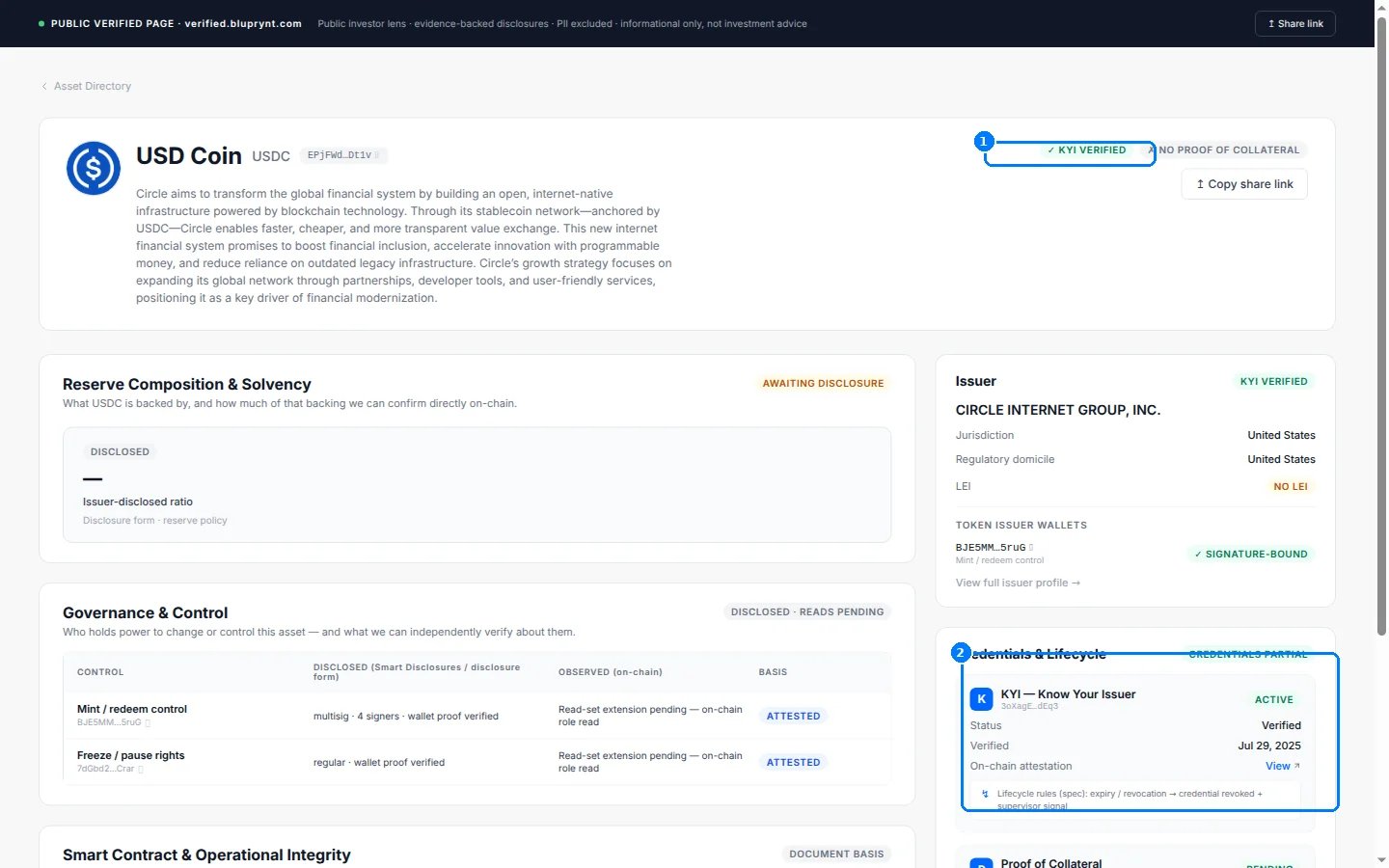 Use `asset_url` as the link and the [badges endpoint](/api/public/badges) as the image:
```html theme={"system"}
Use `asset_url` as the link and the [badges endpoint](/api/public/badges) as the image:
```html theme={"system"}
 ```
Re-run the lookup when you refresh listing data. Verification can be revoked — a cached badge becomes a false claim.
## Worked example
```ts TypeScript — server-side, per listed token theme={"system"}
const res = await fetch(
`https://integrations.bluprynt.com/assets/${token.chain}/${token.address}`,
{ headers: { Authorization: process.env.BLUPRYNT_API_KEY! } },
)
const asset = res.ok ? await res.json() : null
const kyi =
asset?.business_details?.business_verified === true &&
asset.token_details.authorities.every((a) => a.verified)
// Pass { kyi, assetUrl: asset?.asset_url } to your template:
// kyi ? : null
```
```html Template theme={"system"}
{{#if kyi}}
{{/if}}
```
## Troubleshooting
| Symptom | Cause | Fix |
| - | - | - |
| `401` on the lookup | `Bearer` prefix on the key | Send the raw key — see [Authentication](/api/public/authentication). |
| `404` for a token you listed | Not verified, or wrong chain | Check the same address on other chains; show unverified. |
| Badge is a broken image | Invalid parameter combination | Check [Badges](/api/public/badges) — `webp` returns `415`, `size=64` serves 32 px. |
| Badge doesn't update | It's a static image | That's correct — re-check the lookup and drop the badge when verification lapses. |
## FAQ
`business_verified` is the headline KYI state. For a stricter display, require every authority to be `verified` too — the worked example does both.
You can, but linking to `asset_url` is the point — it lets your users verify the claim instead of trusting the image. The image alone proves nothing.
## Related
* [Badges](/api/public/badges) — every variant, theme, format and size
* [Asset lookup](/api/public/asset-lookup) — the record behind the check
* [Token KYI lookup](/api/public/token-lookup) — the per-chain verdict with proof detail
This documentation is built and hosted on [Mintlify](https://mintlify.com), a developer documentation platform.
```
Re-run the lookup when you refresh listing data. Verification can be revoked — a cached badge becomes a false claim.
## Worked example
```ts TypeScript — server-side, per listed token theme={"system"}
const res = await fetch(
`https://integrations.bluprynt.com/assets/${token.chain}/${token.address}`,
{ headers: { Authorization: process.env.BLUPRYNT_API_KEY! } },
)
const asset = res.ok ? await res.json() : null
const kyi =
asset?.business_details?.business_verified === true &&
asset.token_details.authorities.every((a) => a.verified)
// Pass { kyi, assetUrl: asset?.asset_url } to your template:
// kyi ? : null
```
```html Template theme={"system"}
{{#if kyi}}
{{/if}}
```
## Troubleshooting
| Symptom | Cause | Fix |
| - | - | - |
| `401` on the lookup | `Bearer` prefix on the key | Send the raw key — see [Authentication](/api/public/authentication). |
| `404` for a token you listed | Not verified, or wrong chain | Check the same address on other chains; show unverified. |
| Badge is a broken image | Invalid parameter combination | Check [Badges](/api/public/badges) — `webp` returns `415`, `size=64` serves 32 px. |
| Badge doesn't update | It's a static image | That's correct — re-check the lookup and drop the badge when verification lapses. |
## FAQ
`business_verified` is the headline KYI state. For a stricter display, require every authority to be `verified` too — the worked example does both.
You can, but linking to `asset_url` is the point — it lets your users verify the claim instead of trusting the image. The image alone proves nothing.
## Related
* [Badges](/api/public/badges) — every variant, theme, format and size
* [Asset lookup](/api/public/asset-lookup) — the record behind the check
* [Token KYI lookup](/api/public/token-lookup) — the per-chain verdict with proof detail
This documentation is built and hosted on [Mintlify](https://mintlify.com), a developer documentation platform.