> ## Documentation Index
> Fetch the complete documentation index at: https://docs.bluprynt.com/llms.txt
> Use this file to discover all available pages before exploring further.
# Bluprynt Proof
> The Compliance Hub where supervisors review issuers, monitor assets and issue credentials.
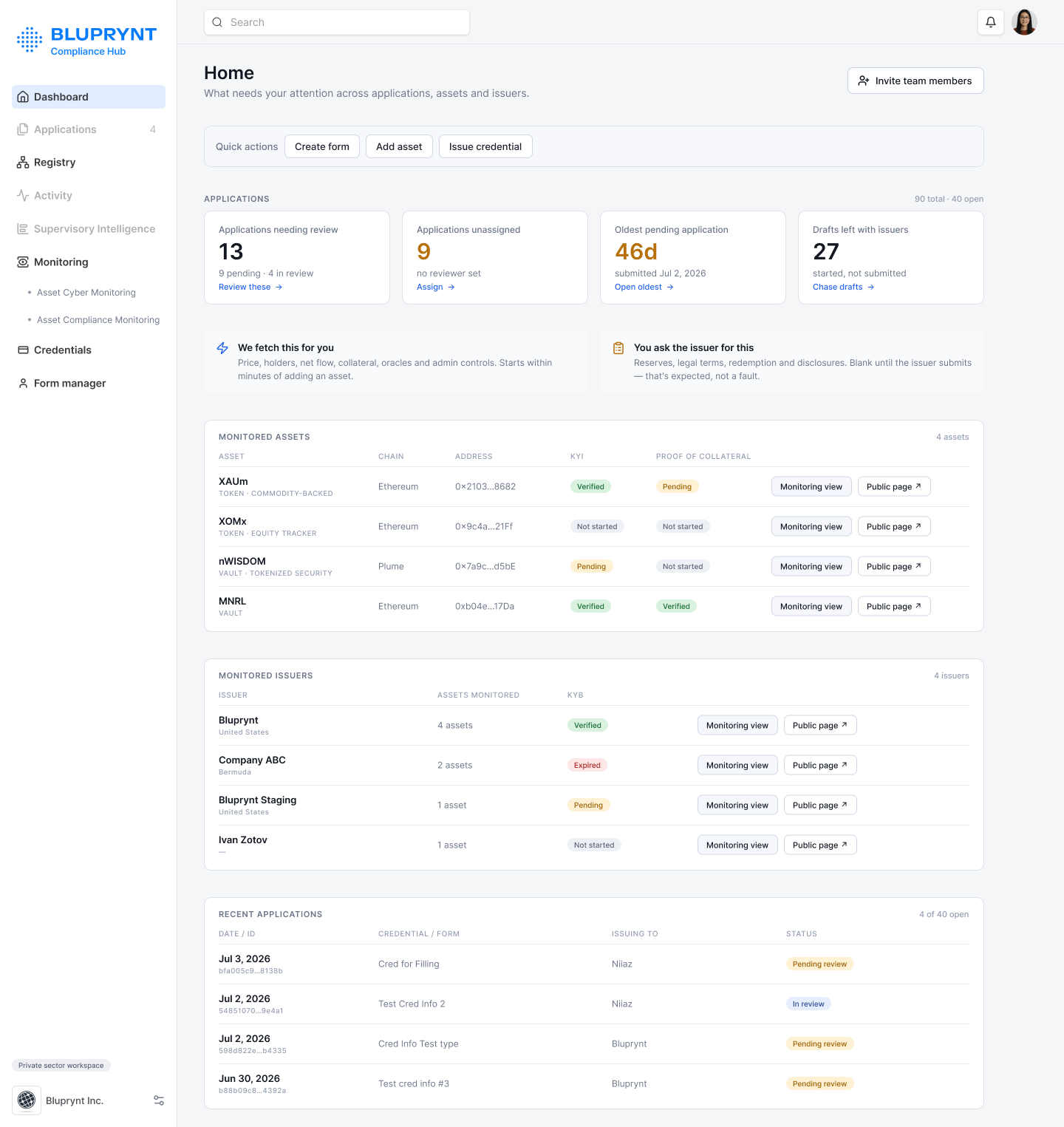 Bluprynt Proof, at [compliance.bluprynt.com](https://compliance.bluprynt.com), is the Compliance Hub for regulators and other supervisors. You build forms, review what issuers submit through [Bluprynt Passport](/passport/overview), watch the assets you supervise, and issue credentials that anyone can check on-chain.
Bluprynt Proof is in early access. Ask [product@bluprynt.com](mailto:product@bluprynt.com) for an organization.
## Key concepts
Every term used across Bluprynt Proof is defined in [Concepts](/proof/concepts).
## How it works
```mermaid theme={"system"}
flowchart TD
A[Build a form] --> B[Issuer applies]
B --> C[You review]
C --> D[Approve]
D --> E[Credential on-chain]
E --> F[Anyone verifies]
classDef start stroke-width:2px
classDef done stroke-width:2px
class A start
class F done
```
## Get started
Sign in, reset your password and see what each role can do.
Set up supervision and see your monitored assets.
Invite members, set roles and manage your account.
## Forms and applications
Create a form, pick its type and credential, and publish.
Every field type, validation and condition.
Set who approves, and in what order.
Find, filter, read and review applications.
Every state, who moves it and how.
## Watchlist
Bluprynt Proof, at [compliance.bluprynt.com](https://compliance.bluprynt.com), is the Compliance Hub for regulators and other supervisors. You build forms, review what issuers submit through [Bluprynt Passport](/passport/overview), watch the assets you supervise, and issue credentials that anyone can check on-chain.
Bluprynt Proof is in early access. Ask [product@bluprynt.com](mailto:product@bluprynt.com) for an organization.
## Key concepts
Every term used across Bluprynt Proof is defined in [Concepts](/proof/concepts).
## How it works
```mermaid theme={"system"}
flowchart TD
A[Build a form] --> B[Issuer applies]
B --> C[You review]
C --> D[Approve]
D --> E[Credential on-chain]
E --> F[Anyone verifies]
classDef start stroke-width:2px
classDef done stroke-width:2px
class A start
class F done
```
## Get started
Sign in, reset your password and see what each role can do.
Set up supervision and see your monitored assets.
Invite members, set roles and manage your account.
## Forms and applications
Create a form, pick its type and credential, and publish.
Every field type, validation and condition.
Set who approves, and in what order.
Find, filter, read and review applications.
Every state, who moves it and how.
## Watchlist
 Your supervised issuers, assets and credentials.
Add tokens one at a time or by CSV. Read the asset graph.
Add issuers, read their profile and request forms.
## Credentials
Your supervised issuers, assets and credentials.
Add tokens one at a time or by CSV. Read the asset graph.
Add issuers, read their profile and request forms.
## Credentials
 Credential types, issuance, contents and verification.
## Who uses what
| Role | Main areas |
| - | - |
| **Super Admin** | Everything, plus members of other organizations |
| **Organization Admin** | Form manager, credential types, members |
| **Reviewer** | Applications assigned to them |
| **Analyst** | Dashboard, Applications, Watchlist, Credentials |
## Not available yet
**Activity**, **Supervisory Intelligence** and **Monitoring** appear greyed out in the sidebar. They aren't available yet.
## Related pages
* [Bluprynt Passport](/passport/overview)
* [KYI](/tools/kyi)
* [Proof of Collateral](/tools/proof-of-collateral)
* [Asset Dependency Engine](/tools/asset-dependency-engine)
This documentation is built and hosted on [Mintlify](https://mintlify.com), a developer documentation platform.
Credential types, issuance, contents and verification.
## Who uses what
| Role | Main areas |
| - | - |
| **Super Admin** | Everything, plus members of other organizations |
| **Organization Admin** | Form manager, credential types, members |
| **Reviewer** | Applications assigned to them |
| **Analyst** | Dashboard, Applications, Watchlist, Credentials |
## Not available yet
**Activity**, **Supervisory Intelligence** and **Monitoring** appear greyed out in the sidebar. They aren't available yet.
## Related pages
* [Bluprynt Passport](/passport/overview)
* [KYI](/tools/kyi)
* [Proof of Collateral](/tools/proof-of-collateral)
* [Asset Dependency Engine](/tools/asset-dependency-engine)
This documentation is built and hosted on [Mintlify](https://mintlify.com), a developer documentation platform.