> ## Documentation Index
> Fetch the complete documentation index at: https://docs.bluprynt.com/llms.txt
> Use this file to discover all available pages before exploring further.
# Compliance Explorer
> The public registry of tokenized assets, issuers, regulators and protocols, with the evidence behind every field.
Compliance Explorer is Bluprynt's public registry of tokenized assets. It shows what each asset, issuer, regulator and protocol has disclosed, where each fact comes from, and what is still missing. Compliance teams, analysts, allocators and supervisors use it to check an asset before they list, hold or underwrite it. Issuers use it to see how their record reads and to claim it.
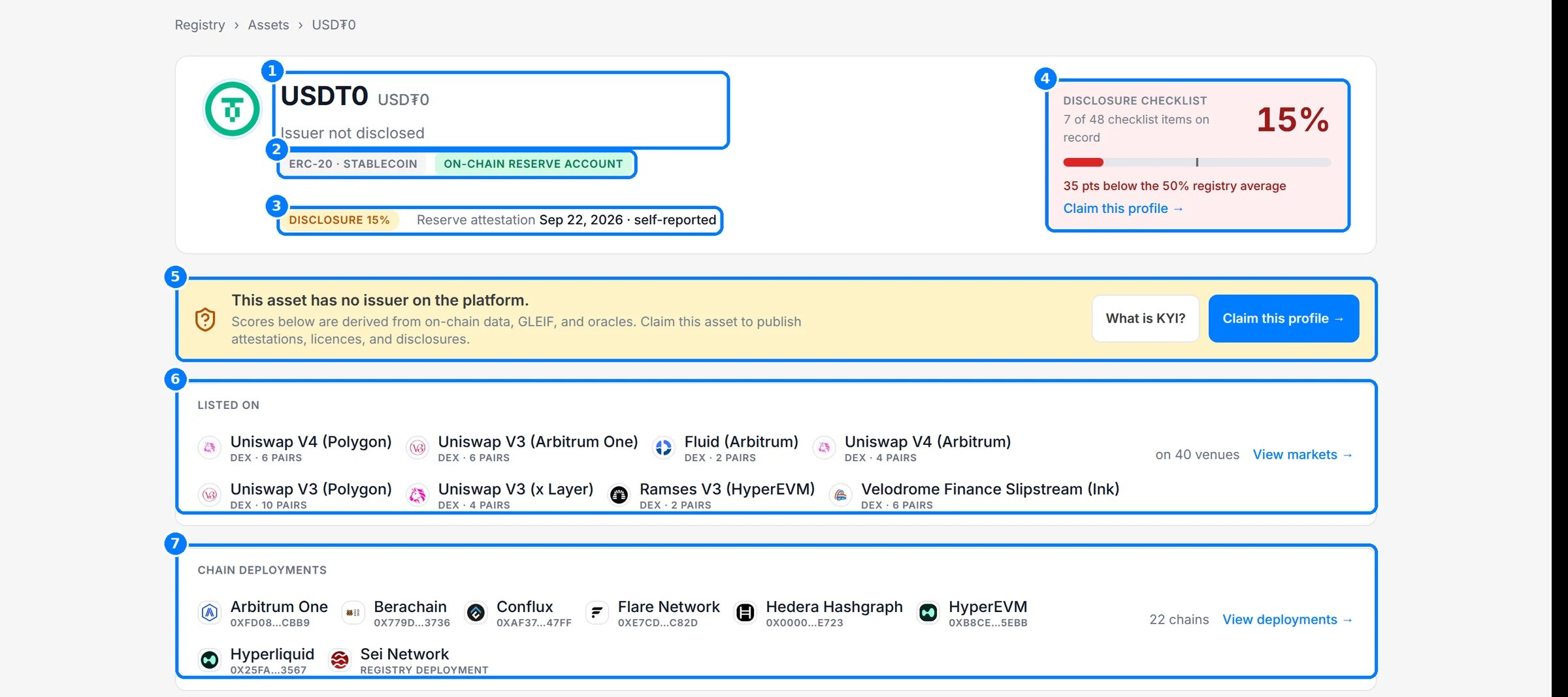 Open it at [explorer.bluprynt.com](https://explorer.bluprynt.com). You can browse public records without an account.
## Feature guides
Find any asset, issuer or contract address from the home page or the header search.
Filter and sort every asset, issuer, regulator and protocol on record.
Read an asset tab by tab, and see where each field's evidence comes from.
See an issuer's compliance profile, a regulator's register and a protocol's footprint.
Understand the 48-item checklist, "Not disclosed", status tags and **Claim this profile**.
Learn what is open, what needs an account or Explorer Pro, and how current each record is.
## Key concepts
Registry, asset, issuer, checklist, **Not disclosed** and Explorer Pro are defined in [Concepts](/explorer/concepts).
## How the registry is built
Every value on a record traces back to a source. Bluprynt reads public documents, on-chain data, regulator registers and GLEIF, then keeps each value with the document it came from.
```mermaid theme={"system"}
flowchart TD
A[Public sources] --> B[Read and extract]
B --> C[Evidenced fields]
C --> D[Disclosure checklist]
D --> E[Explorer record]
F[Issuer claims profile] --> G[KYI verification]
G --> E
classDef start stroke-width:2px
classDef done stroke-width:2px
class A,F start
class E done
```
* **Sources.** Issuer documents and web pages, on-chain contract reads, regulator registers, GLEIF, market data and oracles.
* **Evidenced fields.** Each extracted value keeps its source document, quote and confidence.
* **Checklist.** Each field counts toward the disclosure checklist only when it is on record.
* **Verification.** When an issuer claims its profile and completes KYI, the record shows it as verified instead of inferred.
## Related pages
The graph of every layer an asset depends on.
Watch assets and get notified when their disclosures change.
Read tokenomics changes and run your watchlist from code.
This documentation is built and hosted on [Mintlify](https://mintlify.com), a developer documentation platform.
Open it at [explorer.bluprynt.com](https://explorer.bluprynt.com). You can browse public records without an account.
## Feature guides
Find any asset, issuer or contract address from the home page or the header search.
Filter and sort every asset, issuer, regulator and protocol on record.
Read an asset tab by tab, and see where each field's evidence comes from.
See an issuer's compliance profile, a regulator's register and a protocol's footprint.
Understand the 48-item checklist, "Not disclosed", status tags and **Claim this profile**.
Learn what is open, what needs an account or Explorer Pro, and how current each record is.
## Key concepts
Registry, asset, issuer, checklist, **Not disclosed** and Explorer Pro are defined in [Concepts](/explorer/concepts).
## How the registry is built
Every value on a record traces back to a source. Bluprynt reads public documents, on-chain data, regulator registers and GLEIF, then keeps each value with the document it came from.
```mermaid theme={"system"}
flowchart TD
A[Public sources] --> B[Read and extract]
B --> C[Evidenced fields]
C --> D[Disclosure checklist]
D --> E[Explorer record]
F[Issuer claims profile] --> G[KYI verification]
G --> E
classDef start stroke-width:2px
classDef done stroke-width:2px
class A,F start
class E done
```
* **Sources.** Issuer documents and web pages, on-chain contract reads, regulator registers, GLEIF, market data and oracles.
* **Evidenced fields.** Each extracted value keeps its source document, quote and confidence.
* **Checklist.** Each field counts toward the disclosure checklist only when it is on record.
* **Verification.** When an issuer claims its profile and completes KYI, the record shows it as verified instead of inferred.
## Related pages
The graph of every layer an asset depends on.
Watch assets and get notified when their disclosures change.
Read tokenomics changes and run your watchlist from code.
This documentation is built and hosted on [Mintlify](https://mintlify.com), a developer documentation platform.